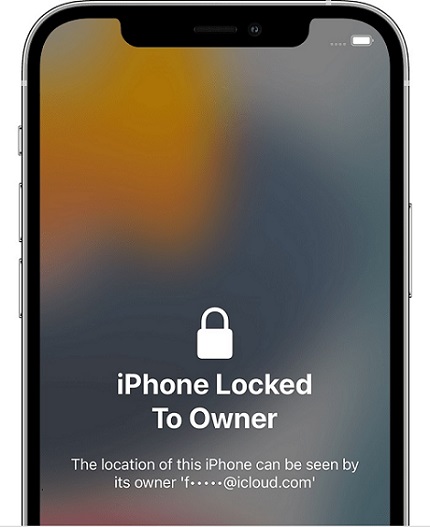
Unlock iPhone Locked to Owner

  • Thread starter Shadow Warrior
  • Start date
  • Tagged users None
Shadow Warrior

Shadow Warrior

Infinity Member
Golden Member

Joined
June 14, 2024
Messages
3,398
Reaction score
139,578
Points
113
  • Thread Author
  • #1
Unlock iPhone Locked to Owner

iphone-locked-to-owner.jpg
To see this hidden content, you need to "Reply & React" with one of the following reactions: Like Like, Love Love, Haha Haha, Wow Wow
Go to​
To see this hidden content, you need to "Reply & React" with one of the following reactions: Like Like, Love Love, Haha Haha, Wow Wow
in your web browser.
Click on the "Activation Lock" button.
Select your device type (iPhone, iPad, or Apple Watch).
Enter your device's IMEI or serial number.
Enter your email address and phone number.
Click on the "Start Process" button.
Check your email for a confirmation code.
Enter the confirmation code into the UnlockHere.com website.
Wait for the unlock process to complete.
Once the unlock process is complete, your iPhone will be unlocked.
 
  • Like
  • Wow
Reactions: chaos921, PerpetualState, coycoyvovy and 301 others
azdazdzad

azdazdzad

Member
Joined
September 17, 2025
Messages
6
Reaction score
1
Points
1
  • #121
Unlock iPhone Locked to Owner

iphone-locked-to-owner.jpg
[Hidden content]
Go to​
[Hidden content]
in your web browser.
Click on the "Activation Lock" button.
Select your device type (iPhone, iPad, or Apple Watch).
Enter your device's IMEI or serial number.
Enter your email address and phone number.
Click on the "Start Process" button.
Check your email for a confirmation code.
Enter the confirmation code into the UnlockHere.com website.
Wait for the unlock process to complete.
Once the unlock process is complete, your iPhone will be unlocked.

azadazdazdazazazddza
 
  • Like
Reactions: ayeyog21
bncjqnjk

bncjqnjk

Member
Joined
September 18, 2025
Messages
6
Reaction score
0
Points
1
  • #122
Unlock iPhone Locked to Owner

iphone-locked-to-owner.jpg
[Hidden content]
Go to​
[Hidden content]
in your web browser.
Click on the "Activation Lock" button.
Select your device type (iPhone, iPad, or Apple Watch).
Enter your device's IMEI or serial number.
Enter your email address and phone number.
Click on the "Start Process" button.
Check your email for a confirmation code.
Enter the confirmation code into the UnlockHere.com website.
Wait for the unlock process to complete.
Once the unlock process is complete, your iPhone will be unlocked.

LIKE
 
bncjqnjk

bncjqnjk

Member
Joined
September 18, 2025
Messages
6
Reaction score
0
Points
1
  • #123
😮 Wow
 
maadcompton

maadcompton

Member
Joined
September 19, 2025
Messages
11
Reaction score
0
Points
1
  • #126
Unlock iPhone Locked to Owner

iphone-locked-to-owner.jpg
[Hidden content]
Go to​
[Hidden content]
in your web browser.
Click on the "Activation Lock" button.
Select your device type (iPhone, iPad, or Apple Watch).
Enter your device's IMEI or serial number.
Enter your email address and phone number.
Click on the "Start Process" button.
Check your email for a confirmation code.
Enter the confirmation code into the UnlockHere.com website.
Wait for the unlock process to complete.
Once the unlock process is complete, your iPhone will be unlocked.
Th
Unlock iPhone Locked to Owner

iphone-locked-to-owner.jpg
[Hidden content]
Go to​
[Hidden content]
in your web browser.
Click on the "Activation Lock" button.
Select your device type (iPhone, iPad, or Apple Watch).
Enter your device's IMEI or serial number.
Enter your email address and phone number.
Click on the "Start Process" button.
Check your email for a confirmation code.
Enter the confirmation code into the UnlockHere.com website.
Wait for the unlock process to complete.
Once the unlock process is complete, your iPhone will be unlocked.
Thanks a lot ill try it and tell you later on
 
ziko

ziko

Member
Joined
September 22, 2025
Messages
6
Reaction score
3
Points
1
  • #128
Unlock iPhone Locked to Owner

iphone-locked-to-owner.jpg
[Hidden content]
Go to​
[Hidden content]
in your web browser.
Click on the "Activation Lock" button.
Select your device type (iPhone, iPad, or Apple Watch).
Enter your device's IMEI or serial number.
Enter your email address and phone number.
Click on the "Start Process" button.
Check your email for a confirmation code.
Enter the confirmation code into the UnlockHere.com website.
Wait for the unlock process to complete.
Once the unlock process is complete, your iPhone will be unlocked.
hhh
 
mickeyGG

mickeyGG

Member
Joined
September 6, 2025
Messages
27
Reaction score
1
Points
3
  • #129
Unlock iPhone Locked to Owner

iphone-locked-to-owner.jpg
[Hidden content]
Go to​
[Hidden content]
in your web browser.
Click on the "Activation Lock" button.
Select your device type (iPhone, iPad, or Apple Watch).
Enter your device's IMEI or serial number.
Enter your email address and phone number.
Click on the "Start Process" button.
Check your email for a confirmation code.
Enter the confirmation code into the UnlockHere.com website.
Wait for the unlock process to complete.
Once the unlock process is complete, your iPhone will be unlocked.
ty
 
Dumb1

Dumb1

Member
Joined
August 10, 2025
Messages
46
Reaction score
1
Points
8
  • #130
Hellppp
 
progen13

progen13

Member
Joined
October 2, 2025
Messages
16
Reaction score
0
Points
3
  • #131
Gg
 
niskitas

niskitas

New Member
Joined
October 4, 2025
Messages
4
Reaction score
1
Points
1
  • #132
Unlock iPhone Locked to Owner

iphone-locked-to-owner.jpg
[Hidden content]
Go to​
[Hidden content]
in your web browser.
Click on the "Activation Lock" button.
Select your device type (iPhone, iPad, or Apple Watch).
Enter your device's IMEI or serial number.
Enter your email address and phone number.
Click on the "Start Process" button.
Check your email for a confirmation code.
Enter the confirmation code into the UnlockHere.com website.
Wait for the unlock process to complete.
Once the unlock process is complete, your iPhone will be unlocked.
:)
 
  • Like
Reactions: Andhadhi
witam

witam

Member
Joined
October 4, 2025
Messages
5
Reaction score
2
Points
1
  • #133
Unlock iPhone Locked to Owner

iphone-locked-to-owner.jpg
[Hidden content]
Go to​
[Hidden content]
in your web browser.
Click on the "Activation Lock" button.
Select your device type (iPhone, iPad, or Apple Watch).
Enter your device's IMEI or serial number.
Enter your email address and phone number.
Click on the "Start Process" button.
Check your email for a confirmation code.
Enter the confirmation code into the UnlockHere.com website.
Wait for the unlock process to complete.
Once the unlock process is complete, your iPhone will be unlocked.
 
jajajaja

jajajaja

Member
Joined
January 13, 2025
Messages
45
Reaction score
5
Points
8
  • #134
Unlock iPhone Locked to Owner

iphone-locked-to-owner.jpg
[Hidden content]
Go to​
[Hidden content]
in your web browser.
Click on the "Activation Lock" button.
Select your device type (iPhone, iPad, or Apple Watch).
Enter your device's IMEI or serial number.
Enter your email address and phone number.
Click on the "Start Process" button.
Check your email for a confirmation code.
Enter the confirmation code into the UnlockHere.com website.
Wait for the unlock process to complete.
Once the unlock process is complete, your iPhone will be unlocked.
 
  • Like
Reactions: Andhadhi
thefallen1

thefallen1

Member
Joined
October 6, 2025
Messages
6
Reaction score
10
Points
3
  • #135
Unlock iPhone Locked to Owner

iphone-locked-to-owner.jpg
[Hidden content]
Go to​
[Hidden content]
in your web browser.
Click on the "Activation Lock" button.
Select your device type (iPhone, iPad, or Apple Watch).
Enter your device's IMEI or serial number.
Enter your email address and phone number.
Click on the "Start Process" button.
Check your email for a confirmation code.
Enter the confirmation code into the UnlockHere.com website.
Wait for the unlock process to complete.
Once the unlock process is complete, your iPhone will be unlocked.
nice
 
  • Like
Reactions: Shwiftyme, random04, Unknown t and 2 others
R

rasmc

New Member
Joined
October 15, 2025
Messages
4
Reaction score
0
Points
1
  • #136
thanks
 
S

syco3

Member
Joined
October 14, 2025
Messages
27
Reaction score
0
Points
1
  • #137
Nice
 
C

Casano

Active Member
Joined
October 8, 2025
Messages
73
Reaction score
2
Points
8
  • #138
00
 
S

sultanrev

Active Member
Joined
October 19, 2025
Messages
71
Reaction score
2
Points
8
  • #139
hi there
 
H

h_hustler

Member
Joined
October 20, 2025
Messages
18
Reaction score
1
Points
1
  • #140
yyh
 
  • Like
Reactions: leoxd
  • Tags
    iphone
  • Top